
Scheduler
The Planificateur (Scheduler) defines, hour by hour, how many workers run — to imitate a human audience (quiet at night, peak in the evening) rather than a flat 24/7 throughput (a bot signal).
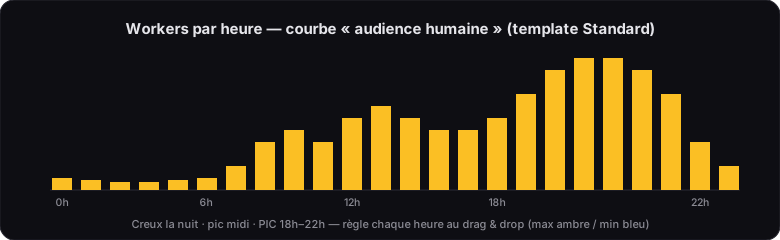
The hourly grid
- One value per hour (0h → 23h) sets the worker target. Adjust it by drag & drop: amber dot = max, blue dot = min.
- The Auto button applies an optimised “human audience” distribution.
- Every hour, the scheduler starts or stops workers to reach the target (graceful stop: tracks in progress finish).
Templates
| Template | Effect |
|---|---|
| Soft | Calmer profile — start out discreetly. |
| Standard | Realistic audience profile, evening peak — recommended (mimics a French listener). |
| Aggressive | More intensive profile, broad peak — high volumes (50+ accounts). |
All settings
| Setting | Role |
|---|---|
| Planificateur activé (Scheduler enabled) | Scheduled mode on/off |
| Variance | Adds randomness between min and max each hour (e.g. a range rather than a fixed value). Turn it on: more human. |
| Workers max | Cap on concurrent workers on the machine (depending on your plan) |
| Durée d’une session (Session duration) (min/max) | When an account is drawn, its session lasts a random duration within this range (capped by the remaining quota). Splits things up: one quota can become a morning session + an afternoon one. |
| Durée d’écoute par morceau (Listening time per track) (min/max) | Time spent on each track before moving to the next |
| Streams simultanés / proxy (Concurrent streams / proxy) | Accounts streaming at the same time through one IP (see Proxies) |
Quick-skip (fast-skip) on warm-up URLs
To imitate a human who skips around, the worker can play a warm-up URL (not your “Mes sons” (My Tracks)) for only a few seconds, then move on to the next.
| Setting | Role |
|---|---|
| Quick-skip activé (Quick-skip enabled) | Enables skipping on warm-up URLs |
| Probabilité (Probability) | Adjustable probability that a warm-up URL gets skipped |
| Durée min / max (Min / max duration) | A few seconds of listening before the skip |
Profitability simulation
The “Simulation rentabilité” (Profitability simulation) button estimates, before you start: streams/day, revenue (min / median / max), 30d / 90d / 365d projections, and the bottleneck (proxy? captcha? quota?). Ideal for calibrating your setup. See also Maximising your revenue.