
Updates
Since V2, Botify updates itself. No more hunting for the .exe by hand: the app checks, downloads, verifies integrity and restarts.
🆕 What’s new — Centralized account creation
The big recent change: account creation is now centralized. You no longer dedicate a machine to creation — a dedicated machine handles it for everyone, 24/7.
What changes for you (streaming):
- No mode to choose — your machines are automatically in streaming. They request the accounts they need and receive them delivered, encrypted, with nothing to do.
- CapSolver key on the streamer side — you now provide your own captcha-solving key (Settings → CapSolver). Without a key (or balance < $0.10), a red alert shows and requests are paused (no point waiting for accounts that won’t come).
- “Accounts to create per day” cap — on the Accounts page you set the max accounts created per day for this machine (default 5). Creation is spread across the day, concentrated on your proxies’ local peak hours.
- Every account is end-to-end encrypted and delivered only to your machine; created via your own proxy (IP consistency from signup).
Other highlights:
- 📊 Hourly planner (creation machine): a graph shows, hour by hour, the real number of accounts to create based on received requests.
- 🖥️ Fleet view enriched: all running machines + a “Received (today)” column (accounts created and sent to each machine today).
- ⚙️ Auto-launch at Windows startup + auto-start of streaming after login (optional — handy on a VPS to resume by itself after a reboot).
- 🔐 Login possible with a short identifier.
- 🛠️ Stability: automatic re-login on expired sessions, creation workers that scale to demand on their own, tighter request cadence, and various robustness fixes.
How it works
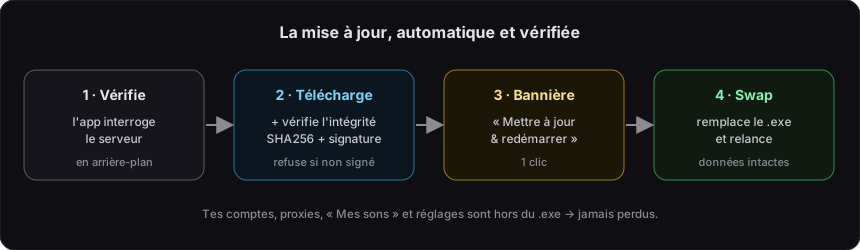
- Check — in the background, the app regularly asks the server whether a newer version exists.
- Download & verify — if so, it downloads the new
.exeand checks its fingerprint (SHA256) and its cryptographic signature. A file not signed by the publisher is rejected — installing a fake update is impossible. - Banner — a « Mettre à jour & redémarrer » (Update & restart) banner appears in the app. One click is enough.
- Replacement & restart — the app closes, a helper replaces the old
.exewith the new one, then restarts Botify automatically.
Mandatory updates
Some versions are flagged as mandatory (important security fix). In that case, the update is applied automatically at the next startup, without waiting for the click — the app never runs on a critically outdated version.
You lose nothing
Your accounts, proxies, « Mes sons » (My tracks) and settings are stored outside the .exe (in %APPDATA%\Botify). The update only changes the executable: no data lost, no reconfiguration.
Why versions expire
Every version has a limited lifetime. This is deliberate:
- It limits the impact of a possible leak (an old compromised version does not affect newer ones).
- It forces fixes to be rolled out regularly.
- It makes any attempt to crack the app far harder → protects the whole ecosystem.
With auto-update it is transparent: you click the banner when it appears, and that is it.