
Streaming mode
A machine in Streaming mode plays your tracks through your accounts, behind their proxies, on a schedule. It receives its accounts automatically from the creation machine.
Key settings
- Workers simultanés (Concurrent workers) — the number of Chrome instances listening at the same time. More = more throughput, but more load. On a VPS, aim for a number that stays stable without CPU spikes (spikes crash Chrome). Capped by your plan.
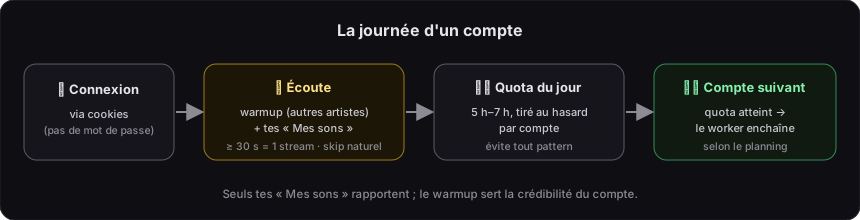
- Quota d’écoute par compte (Listening quota per account) — a random daily quota per account to avoid the “every account listens the same” pattern. The worker moves on to the next account once the quota is reached.
- Accélération GPU (GPU acceleration) — disabled (VPS machines have no GPU): light software rendering, no CPU saturation.
- Sauvegarde cloud (Cloud backup) — manual (Paramètres → Mon compte). Not very useful with automatic distribution: accounts already arrive on the right machine.
Start / stop
- ▶ Lancer streams (Start streams) — starts according to the Scheduler (or continuously).
- ■ Arrêter (Stop) — graceful stop (tracks in progress finish). Click again to force stop.
Dashboard
Aggregates the machine’s local activity:
| Metric | Meaning |
|---|---|
| Streams globaux | All streams (warm-up + “Mes sons” (My Tracks)), all-time. |
| Streams Mes sons | Your tracks only → the basis for the revenue calculation. |
| Revenus estimés | Based on Mes sons streams (~$0.0025–0.005/stream, median × 0.00375). |
| Comptes | Total, including new (warm-up) and active. |
| Bots actifs | Workers currently playing, in real time. |
A chart plots streams per day (24h → 1 year, 2 series: global vs Mes sons). A dot shows the server sync status (periodic push) — these stats feed the Machine fleet.
Live activity
The Activité (Activity) tab shows, for each worker: the account, the track currently playing, the timer and the session’s progress.
Next steps
- Proxies — essential.
- Accounts & music — statuses, “Mes sons”, warm-up.
- Scheduler — hours & volume.